Introducing Lyle
Introducing Lyle: a no-frills smart trainer app for people who know what they want to do. It’s free and runs in your browser; try it on a computer with Chrome or Edge.
Over the last 10 years, I have used my fair share of apps for smart trainers, like Wahoo SYSTM, TrainingPeaks Virtual, TrainerRoad, and Zwift. I found all of them missing some features that I thought they should have, like programmatic mode switches, while also being flooded with bells and whistles that I never use.
Lyle1 is an app for creating and riding more expressive workouts on your smart trainer. Actually, it is two apps: one for building workouts and one for riding them. Some of the features work hand in hand, though, so I will go through them by feature and not by app.
I usually avoid saying what things are not, but I wanted this app to have a few qualities that I think are expressed by what is not there:
- It is neither a social app nor a virtual world. You have enough chat apps, right?
- There are no accounts or syncing with other apps like Strava. Everything runs in-browser, on your computer.
- There is no “spying”. It is a static web app; it does not send your data back to me; it doesn’t recommend you cookie-cutter or AI-generated workouts or plans. You know what you want.
Key Features
Programmatic (and Smooth) Mode Switches
This is the flagship feature and my main motivation for building the app.
If you have ever tried to do workouts like over/unders or tempo with sprints on a trainer, you know the dilemma: Riding in ERG2 mode fixes the long stretches at lower intensity, but is a limiter when you really want to go all-out. How can you really know your max effort ahead of time when programming the workout? On the other hand, SIM mode takes a lot of discipline to follow, and you also get huge power drops after the surges, because the flywheel’s momentum takes some time to spin down to the lower speed.
The Lyle Builder lets you declare the trainer mode in each step of the workout. You can keep the tempo part of the interval in ERG mode, but have the trainer automatically switch to SIM mode when it’s time to sprint.
And the Lyle Player handles the switch smoothly. Have you ever switched to SIM mode at the wrong gradient and found yourself needing to shift about 10 gears to get back to the right power? When a mode switch approaches, Lyle checks your average speed in the three seconds before the switch and chooses the right gradient for a smooth handover.
You can even set a percentage of the target to match at. Let’s say that you want to target 130% FTP in your upcoming surge. You can tell the SIM handover to match at 90% of that (as in, 117% FTP) at your current speed. Why configure this? Well, if you are training to surge in a race, you do want to quite literally accelerate: rev up the cadence and shift into a higher gear.
The Lyle Player also allows you to manually switch the trainer mode in-workout, and the smooth switches apply there too; just keep pedaling at the same cadence and the power will stay constant.
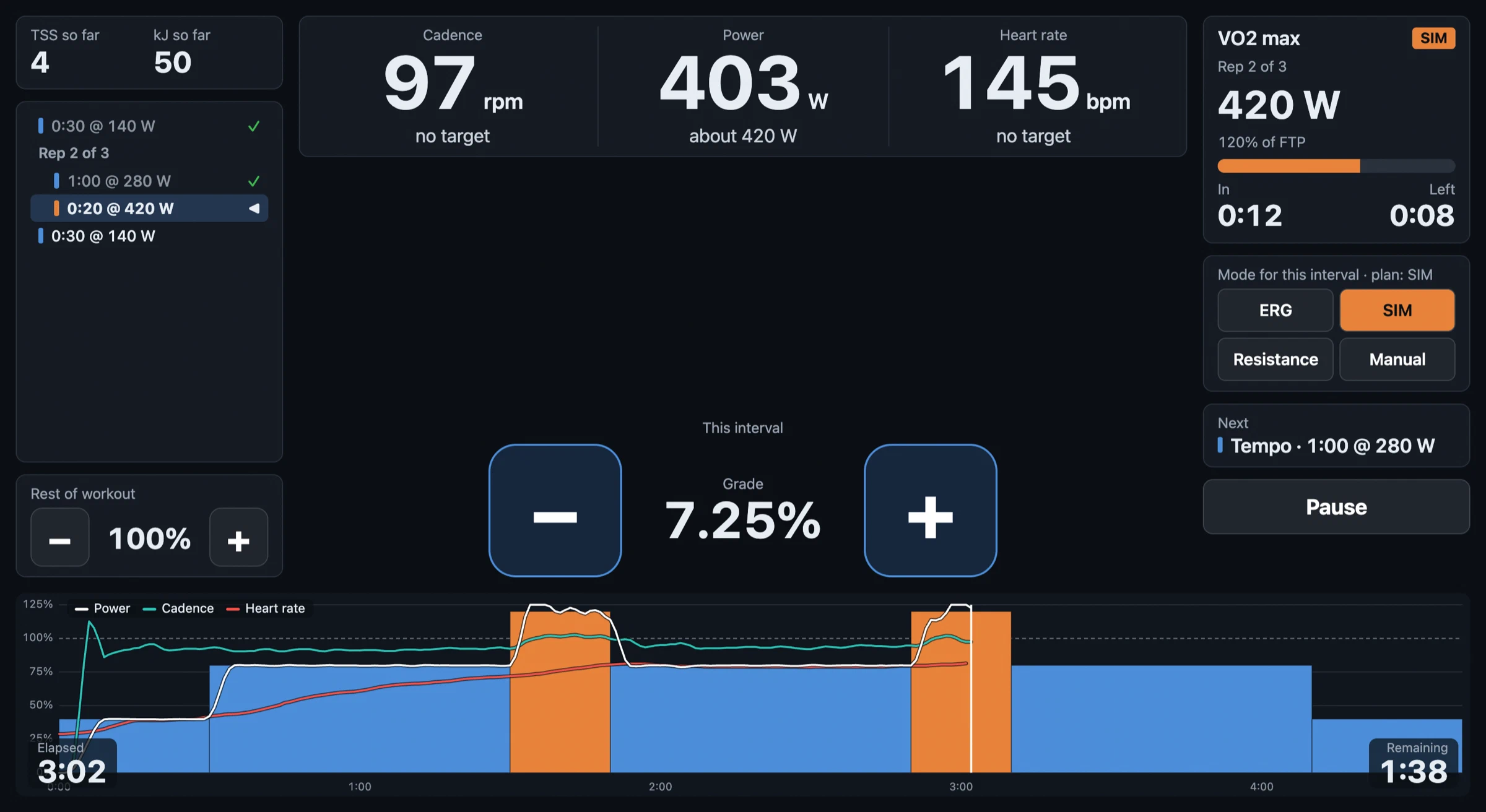 A workout with mode switches. ERG mode in blue, SIM in orange. See how the power (white)
transitions smoothly. The app auto-calculated the 7.25% gradient based on the speed just before the
switch.
Expressive Repeats
Most workout builders limit you to basics like two- or three-step repeats. But what if you want something more expressive? For example, multiple sets of over/unders with rest between them. With Lyle, you can create that by turning any step or set of multiple steps into a repeat, including repeats within repeats.
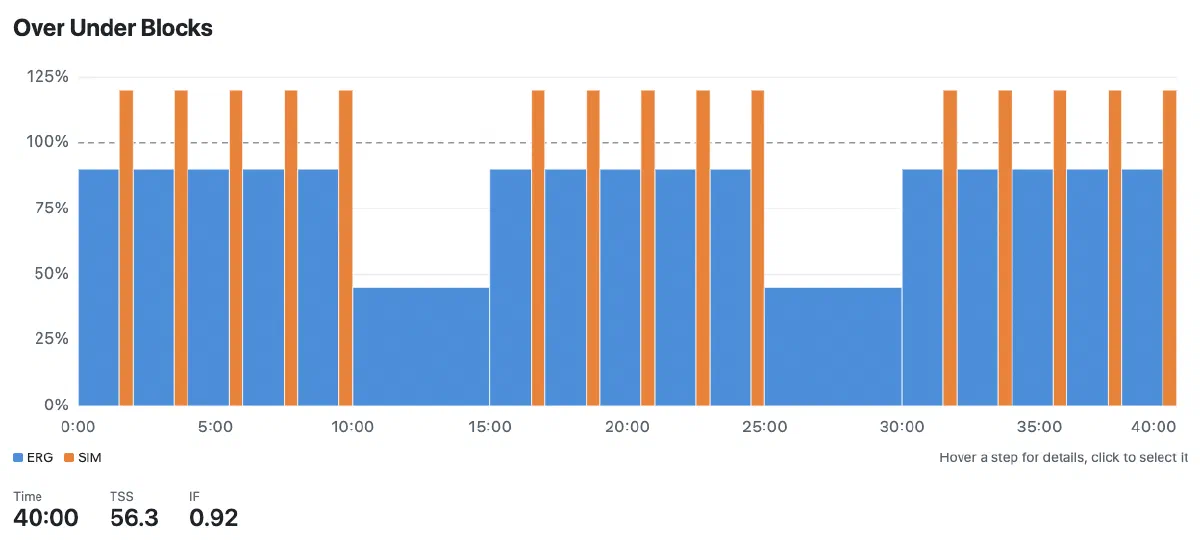 Three sets of over/unders, built within a single control block.
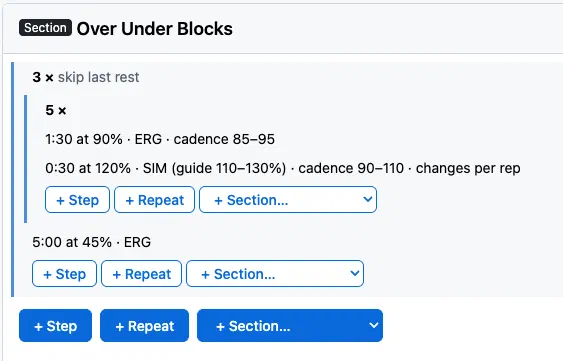 The control block to build that section: three outer reps (the sets)
with five inner reps (the over/unders).
You can also make repeats progressive. Let’s say you want each one to be a little longer, or harder, or easier. You can set fixed progressions, e.g., “-1% each rep”, or expand the menu to customize each rep individually.
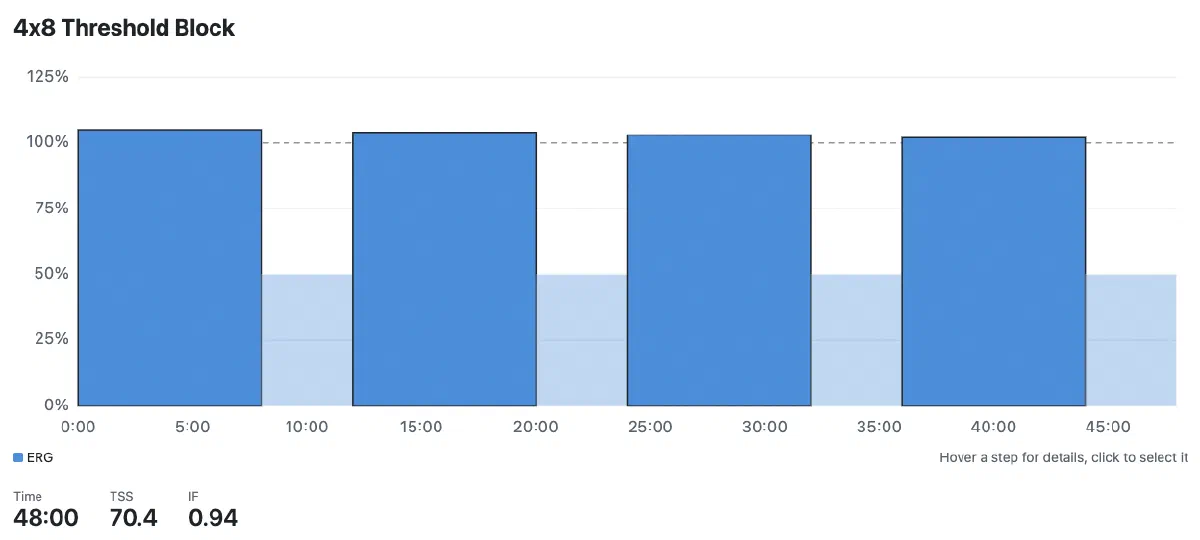 Set of 4x8 intervals with each rep a little bit easier.
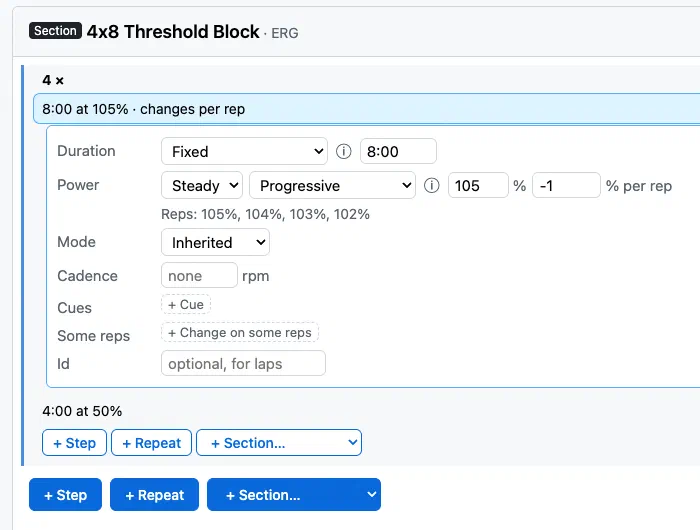 The control block to build that section: Notice the “-1%” on each rep.
You can also use this feature to build ramps, which are “single-step progressive repeats”. More below on how you can handle failure in a ramp test.
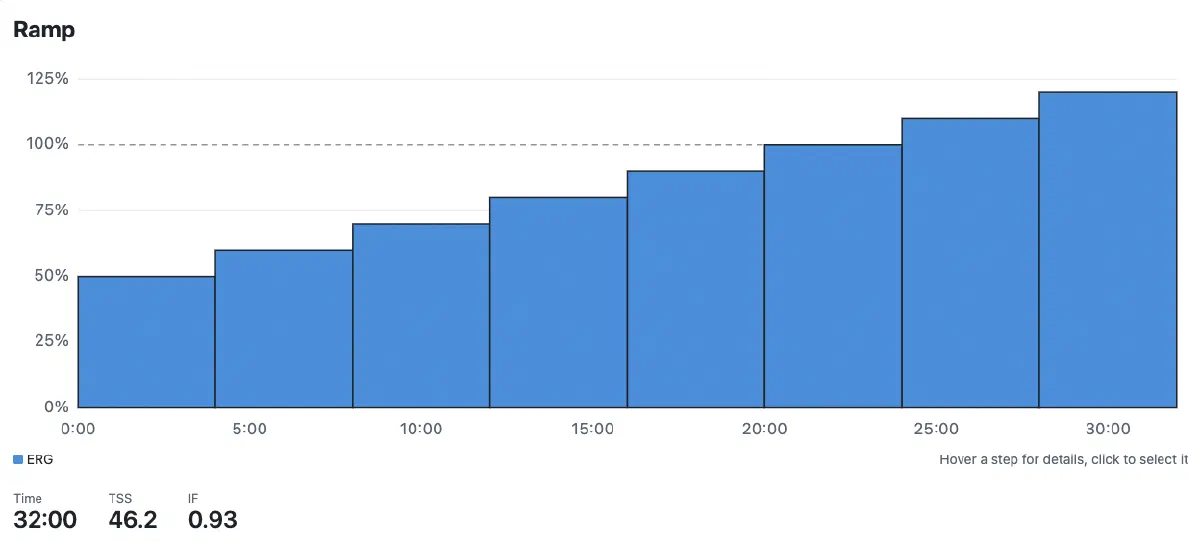 Building a ramp by repeating a single step with a progressive change.
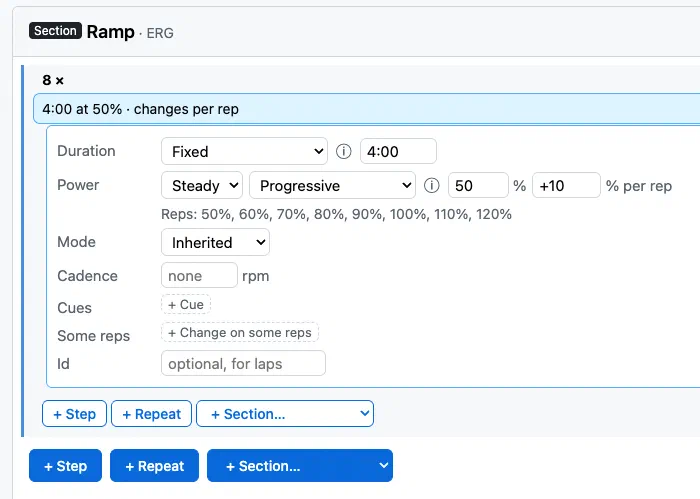 The control block to build that section: 8x but only one step.
Saved Sections
Do you always like to do the same warmup or cooldown? Personally, I like to warm up by doing five minutes easy, then three reps of 90 seconds each at 90%, 95%, and 100% FTP, then another five minutes easy before getting into the hard stuff.
Most workout builders make you repeat all those steps every time you make a workout. With Lyle, you can save patterns that you want to reuse later, whether that be a warmup, cooldown, or types of interval blocks.
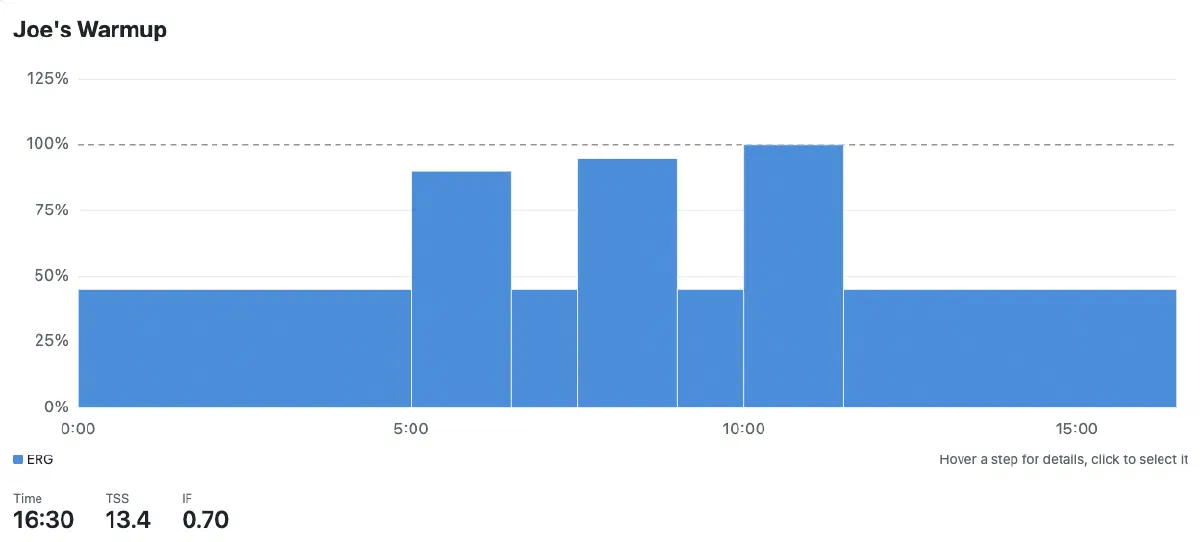 My preferred warmup.
Composing workouts then becomes very easy.
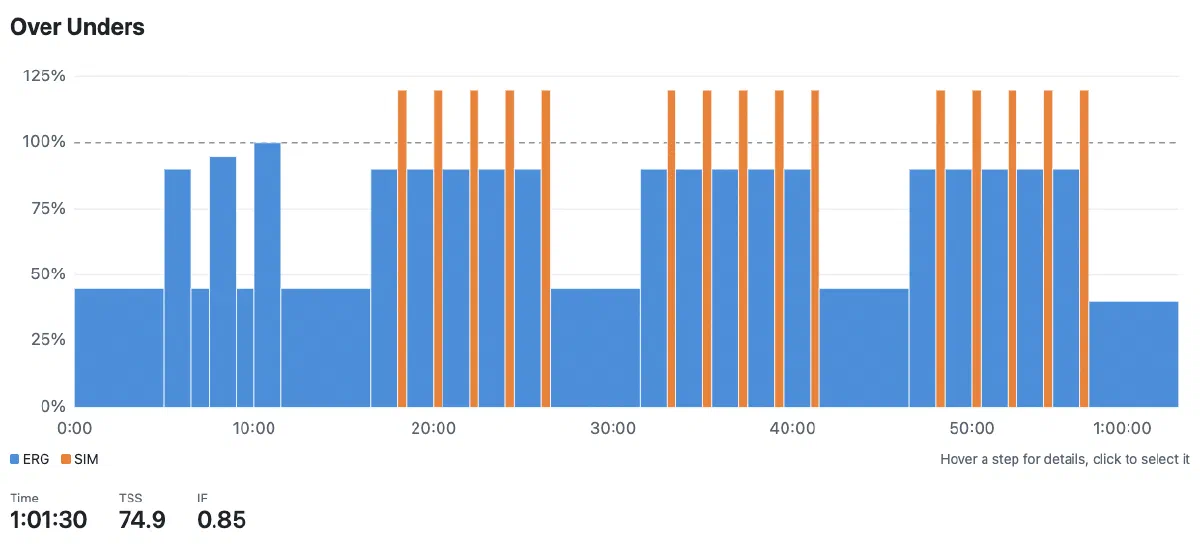 A full workout with warmup, over/unders, and cooldown.
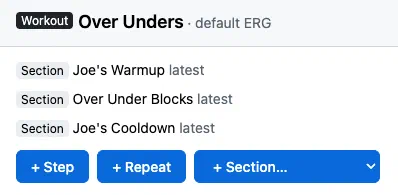 Defined in just three steps. Each one here says “latest”; sections are versioned, and you can apply
updates to all workouts or make one-off tweaks when you want to.
Easy In-Player Control
Have you noticed that data screens on trainer apps are overcrowded with information and that the trainer controls can be hard to access? For example, in TrainingPeaks Virtual, changing the ERG targets by percent requires touching tiny buttons on the far left edge.
In Lyle, the UI is simple and the controls are prominent. Big +/- buttons in the middle of the screen control the power (in 1% increments in ERG mode, in 0.25% gradient in SIM mode, and in 0.5 levels in RES mode). If you are on a computer, the space bar also works as “minus”. If you are really suffering, you don’t need to point and click. Just hit the space bar. In ERG mode, those changes apply to the current interval. On the left there is another set of buttons that scale the targets for the remainder of the workout.
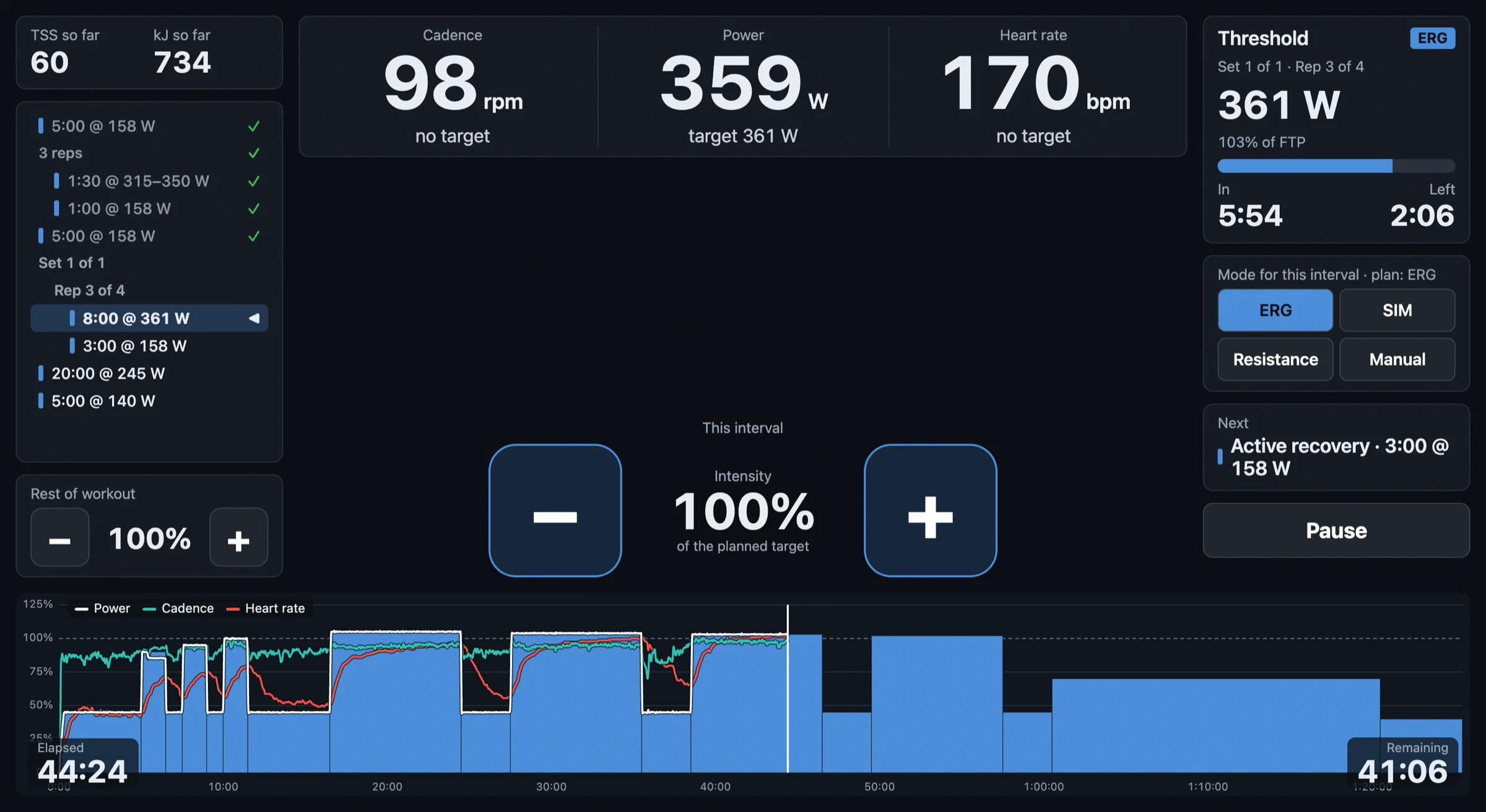 The UI during a 4x8 FTP workout with 20 minutes at VT1.
Test Mode and Steps to Failure
The workout Player has gentle restarts if you fail in ERG mode to avoid the death spiral.3 But what if that is what you are actually testing? The center where I train uses the following test protocol for maximal aerobic power (MAP) and critical power (CP):
- Start with two minutes at 50 watts.
- Ramp test from 100 watts to failure, with a linear ramp at 30 watts per minute.
- Immediately after failure, an all-out three-minute effort. (Yes, it’s diabolical.)
- End.
The failure point in the ramp test defines the MAP, and the last 30 seconds of the three-minute effort define the CP. With Lyle, you can declare a special failure mode on certain steps that will do something like jump to the next step instead of helping you recover the ERG target.
In Lyle’s Builder, you define exactly what constitutes failure; the default is a cadence under 70 rpm for three seconds. Failure can also be manually triggered by pressing the Shift key.
Following failure, you can set the next step’s power target as a percentage of the power at which you failed. If you need a starting point in a test like this, use 75% (mine here is set to 80%, as my CP is relatively close to my MAP4). Unlike the surge example earlier, match at 100% here: the goal is a steady all-out effort, not an acceleration.
Also note that, unlike the previous example with a stepped ramp, this is a linear ramp. The Builder supports that too; just state the start and end values.
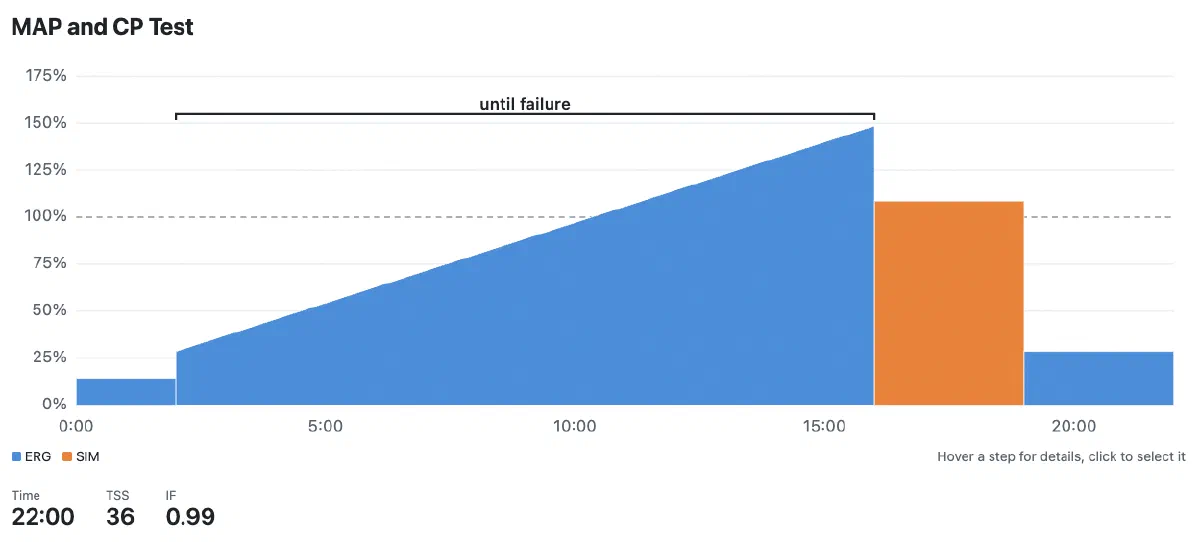 The previously described ramp test.
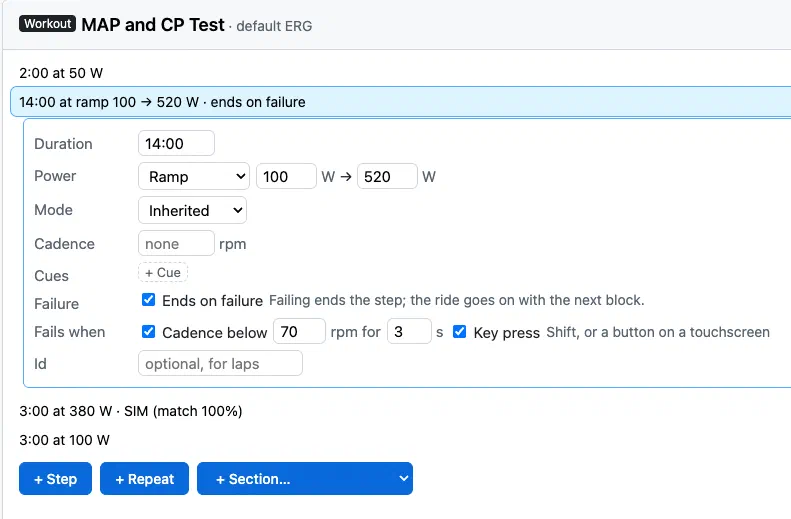 The control block to build the ramp component; note the conditions for what defines “failure”. In
this Builder mode, you can also enter power in watts directly.
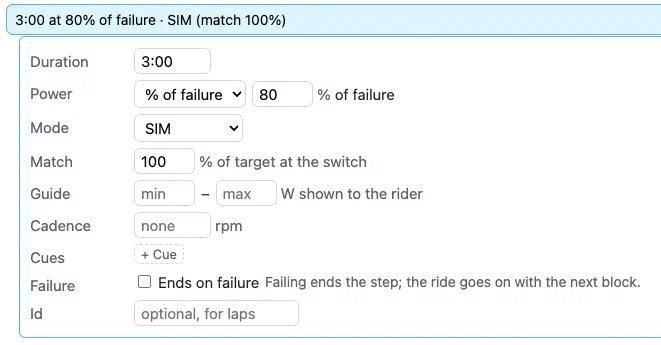 The control block to build the all-out three-minute effort in SIM mode.
Finally, here is the Player the last time I did this test:
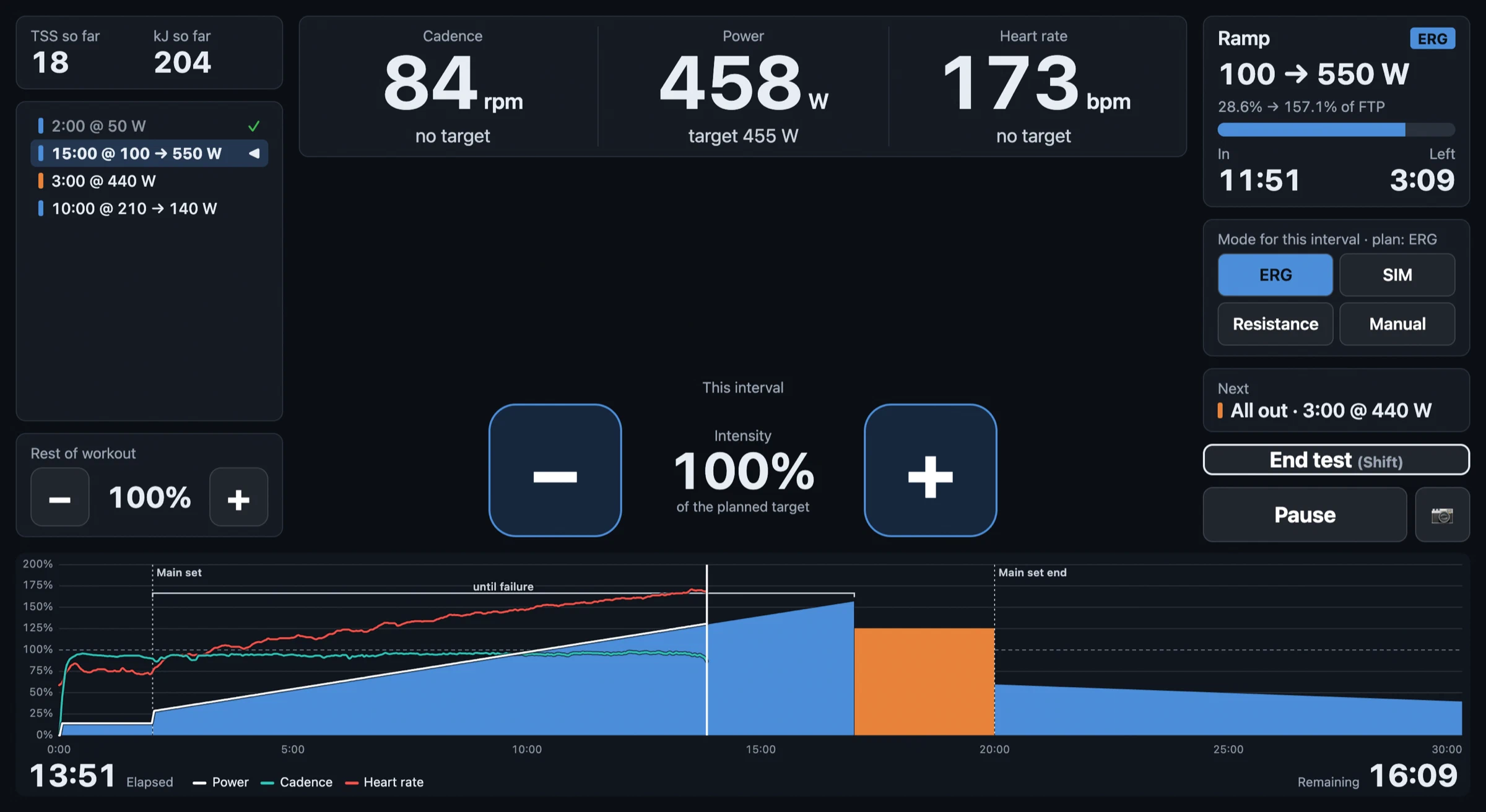 During the ramp test, still in ERG mode and climbing the ramp toward my MAP.
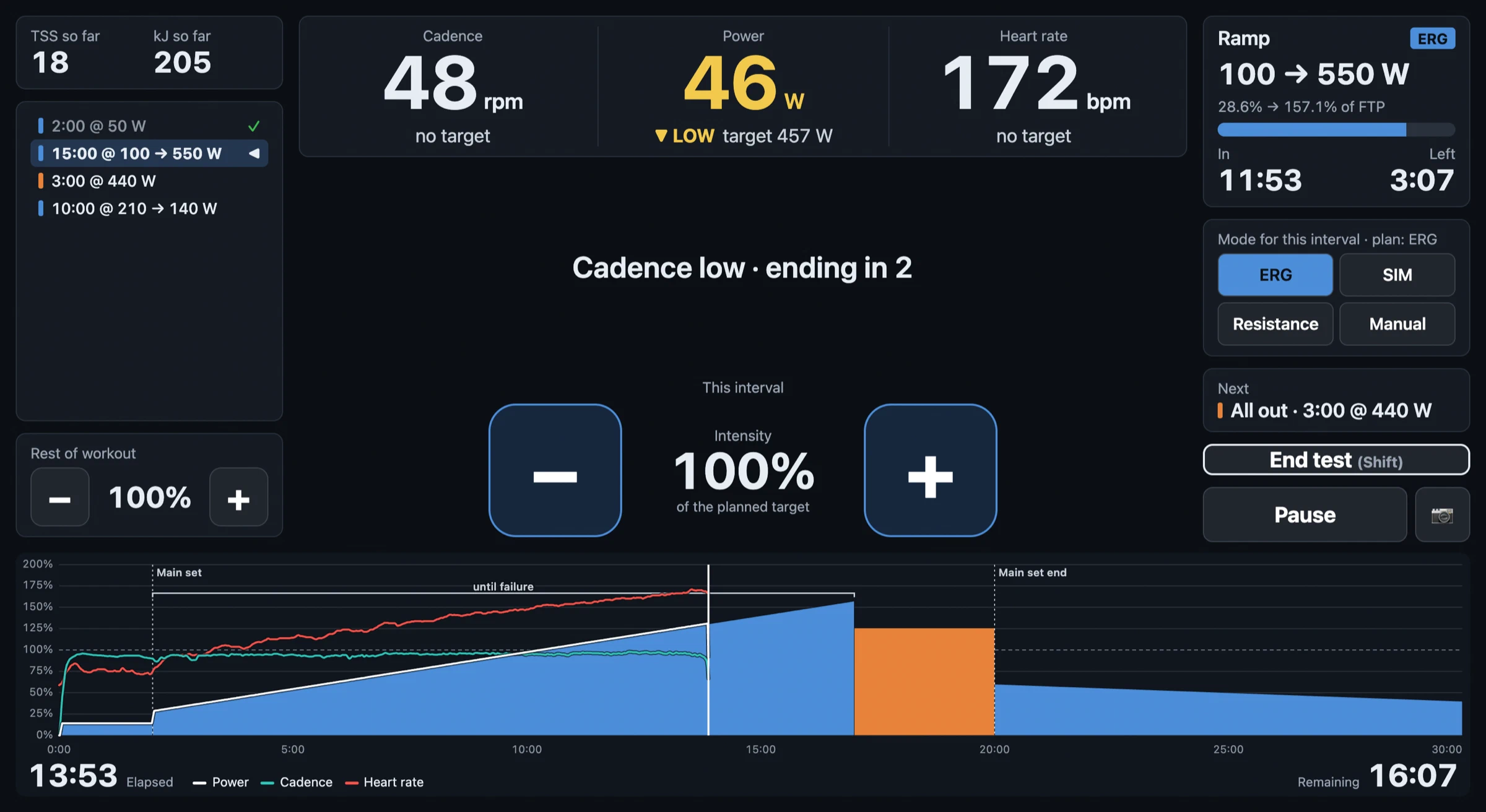 Two seconds later, I failed; you can see the countdown to triggering the switch. There is still
more ramp left, but the Player knows to skip to the next step.
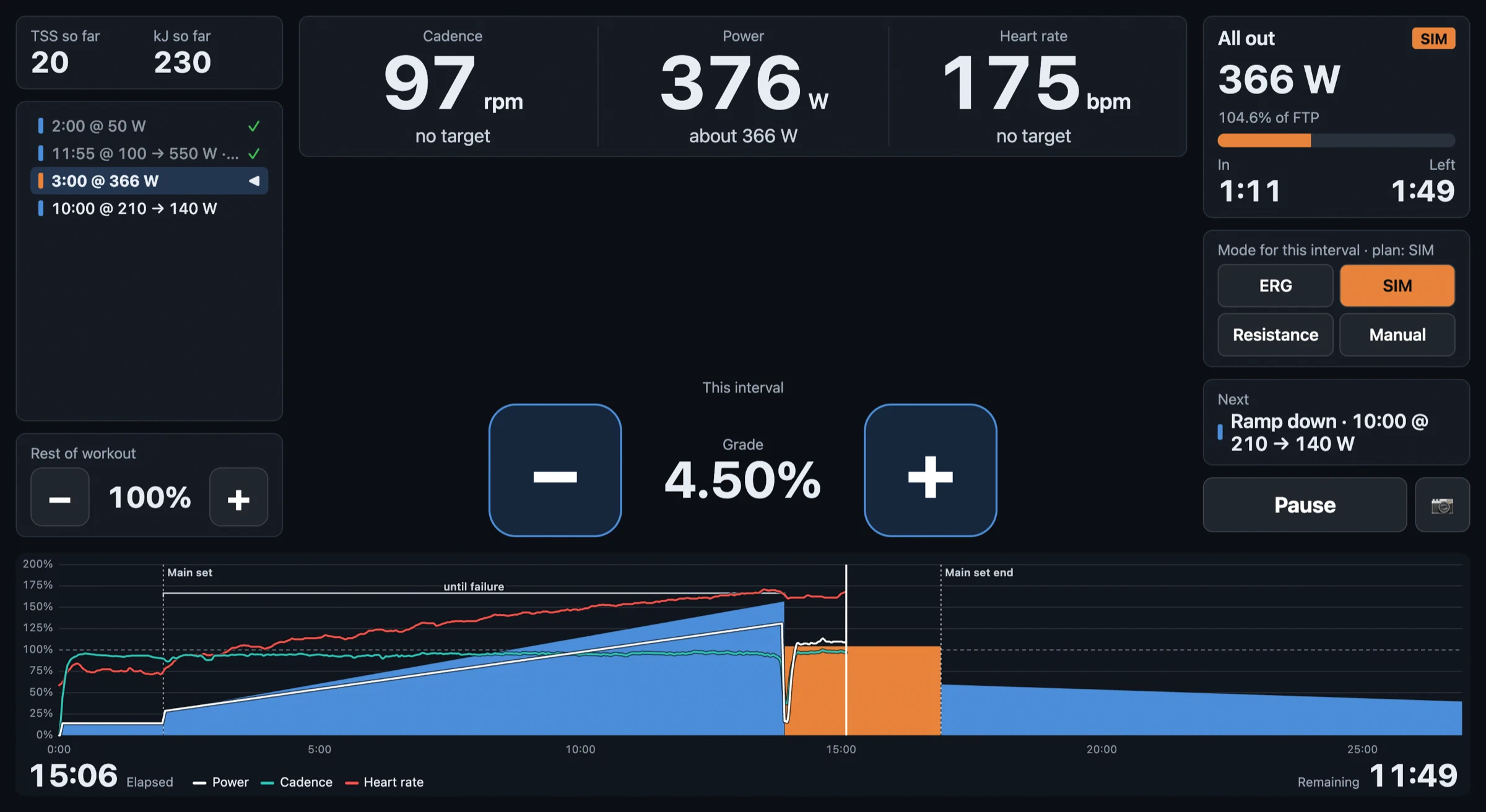 The Player has automatically switched the trainer to SIM mode, targeting 80% of my failure power
(366 watts).
Caveats
I built this for myself, the trainer app that I wanted. I am more of a protocol engineer and have limited TypeScript experience and literally zero UI design experience. I mostly built this with Claude Code. I started it largely as an experiment, but then realized that I actually like it better than the other apps that I use, so I have been using Lyle as my main app for building, doing, and recording workouts on the trainer.
I have only tested this within a very limited scope:
- Computer: MacBook Pro (M3 Pro) with Google Chrome
- Devices: Wahoo KICKR V5, Assault Fitness Airbike,5 Polar H10 heart rate strap
If you want to try it out, I would be happy to hear your feedback or requests, e.g., more features or device support. Again, it is live at https://lyle.petrow.ski/, and you can contact me by email at joe@petrow.ski.
Named after the weight-room guru/wraith in “Infinite Jest” who likes to lick/inhale the sweat of the players who come to him for advice. ↩︎
For the uninitiated, ergometer (ERG) mode more or less forces the rider to hold a target power, regardless of how fast they are going. Simulation (SIM) mode simulates riding on a hill, where the faster you ride, the harder it gets. Resistance (RES) mode just applies a fixed braking force. It’s hard to work with programmatically, as the values don’t correspond to anything. ↩︎
A death spiral is when you are riding in ERG mode and you actually fail to hold the target power. As you slow down, the braking force becomes enormous (power = force × velocity, so when one goes down, the other must go up). Under normal circumstances, Lyle, like most apps these days, has a recovery mode where it releases the brake for you to get back up to speed. Testing, however, is not “normal circumstances”. ↩︎
This is not boasting. It just means that my W′, roughly my ability to perform above critical power, is quite frankly embarrassing. ↩︎
This guy. My strength and conditioning coach (not named Lyle, and not a sweat licker, as far as I know) has me do some VO2 max workouts on it, as my main sport these days is SkiMo and the Airbike gets the arms involved. It doesn’t have any control modes, but it does broadcast power and cadence, and neither my Garmin Edge bike computer nor my Suunto watch would discover and connect to it. Lyle did, so I use it to record workouts on that. ↩︎